
Figma to Flutter in seconds. Finished by Claude.
Convert any Figma frame into runnable Flutter instantly. Then let your own Claude turn it into production code — clean architecture, real navigation, every screen checked against your design.
Free Figma plugin · No card to try · From ₹149 ·
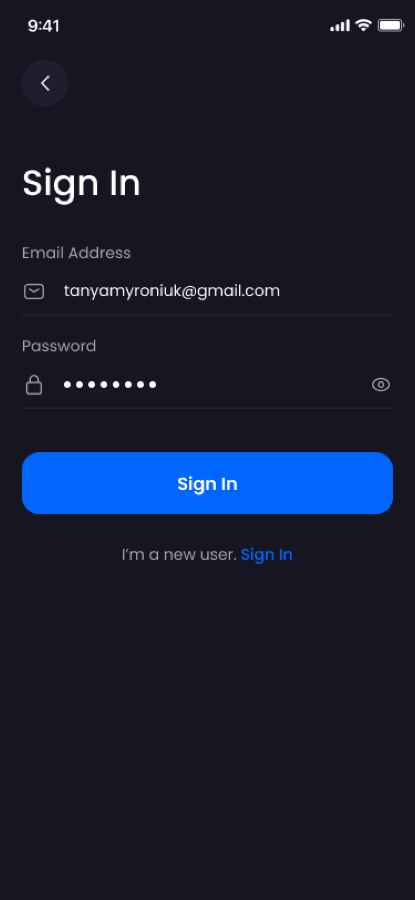
Figma frame
Claude Code
Production Flutter
// lib/views/auth/sign_in_view.dart
class SignInView extends StatelessWidget {
  Widget build(context) => Scaffold(
    appBar: AppHeader(),
    body: Column(children: [
      AppTextField(
        hint: 'Email Address',
        icon: AppAssets.icMail),
      AppPasswordField(),
      AppButton(
        label: 'Sign In',
        onTap: () => AppRoutes.home),
    ]),
  );
}
Design: BankPick — Financial Management UI, Figma Community, CC BY 4.0
Pick your speed.
Or use both.
Every plan unlocks both. Use Instant when you need Flutter now. Use Claude when you're ready to ship.
Instant
Figma frame to runnable Flutter, in seconds.
- Real Row, Column and ListView layout
- Live preview in your browser
- Download a project that runs first time
Best for: prototypes, quick handoff
With Claude
One command in Claude Code. A production app comes out.
- Clean architecture: theme, widgets, routes
- Every screen checked against your design
- Runs on your own Claude — code stays on your machine
Best for: apps you'll ship
Watch a design
become an app.
01 — NAME
Assets get real names
group_2847.svg becomes icMail. Claude reads your design and names everything by meaning.
02 — STRUCTURE
A real app skeleton
Theme, colour tokens, shared widgets and routes — the code a senior developer would write.
03 — VERIFY
Checked against Figma
Every screen is rendered and compared with your design until it matches. No guessing.
assets
lib/
app/
  app_routes.dart    named routes
  app_shell.dart     tabs
core/theme/
  app_colors.dart    13 tokens
  app_typography.dart
widgets/
  app_button.dart
  app_text_field.dart
views/
  auth/sign_in_view.dart
  profile/profile_view.dart

Color(0xFF0066FF)   →  AppColors.primary
SizedBox(width: 335) →  double.infinity
Figma
Your app
✓ matches designLess money.
Fewer surprises.
Most tools charge per seat or by credit, and work best after you restructure your design. Desynq is one flat price, reads your Figma as it is, and checks every screen.
| Desynq | Locofy | Builder.io | FlutterFlow | |
|---|---|---|---|---|
| Monthly price | ₹799 (~$10) | $40 – $80 | $24 per user | From $39 |
| Usage limits | No credits to run out | 2,000 – 4,000 tokens | 500 credits, then $25 per 500 | Per seat |
| Frames per project | No cap | 10 – 25 | — | — |
| Your designs train AI | Never | May, on Hobby | On by default, Free & Pro | — |
| Design prep | Use your Figma as it is | Best with well-structured layers | — | Screens built in their app editor |
| Every screen checked against Figma | Automatically | — | — | — |
| Try before you pay | Free tier + ₹149 day pass | 7-day free trial | Free tier | — |
From each company's pricing page, 26 Sept 2026, monthly billing. — = not stated on their pricing page. Plans change; check before you decide.
One plan.
Everything included.
No seats, no credits, no surprise bills. Claude runs on your own subscription.
Flutter today.
Every framework next.
The same engine, the same Claude flow — for the stack your team already uses.
Questions
Is it one plan or two?
One. Every paid plan unlocks both Instant conversion and the Claude cleanup. Use whichever you need, per project.
Do I need Claude?
Only for the Claude cleanup. It runs in your own Claude Code, on your own Claude subscription, so we never add an AI bill. Instant works without it.
Where does my code end up?
In a folder on your machine. Claude edits it there, and you keep everything.
Is the free converter AI?
No. Instant is a precise engine: the same frame always gives the same code. Claude is the optional finishing pass.
Which frameworks are supported?
Flutter today. React, SwiftUI, Jetpack Compose and React Native are next — join the waitlist to hear first.